NeoCal Introduction
If you're tired of spending way too much time figuring out when to schedule meetings or constantly jumping between apps to manage your calendar, you're not alone. Most of us waste precious minutes every day just trying to coordinate schedules, set reminders, and keep track of appointments across different time zones. What if you could just tell your calendar what you need in plain English and let it handle all the heavy lifting? That's exactly what NeoCal promises to do. This AI-powered calendar tool lets you manage your entire schedule using simple, everyday language commands. Instead of clicking through endless menus and forms, you can just type or say things like “Schedule lunch with Sarah next Tuesday” and NeoCal takes care of the rest. For busy professionals and small business owners who need to make every minute count, this could be the scheduling solution you've been looking for.
NeoCal Key Features
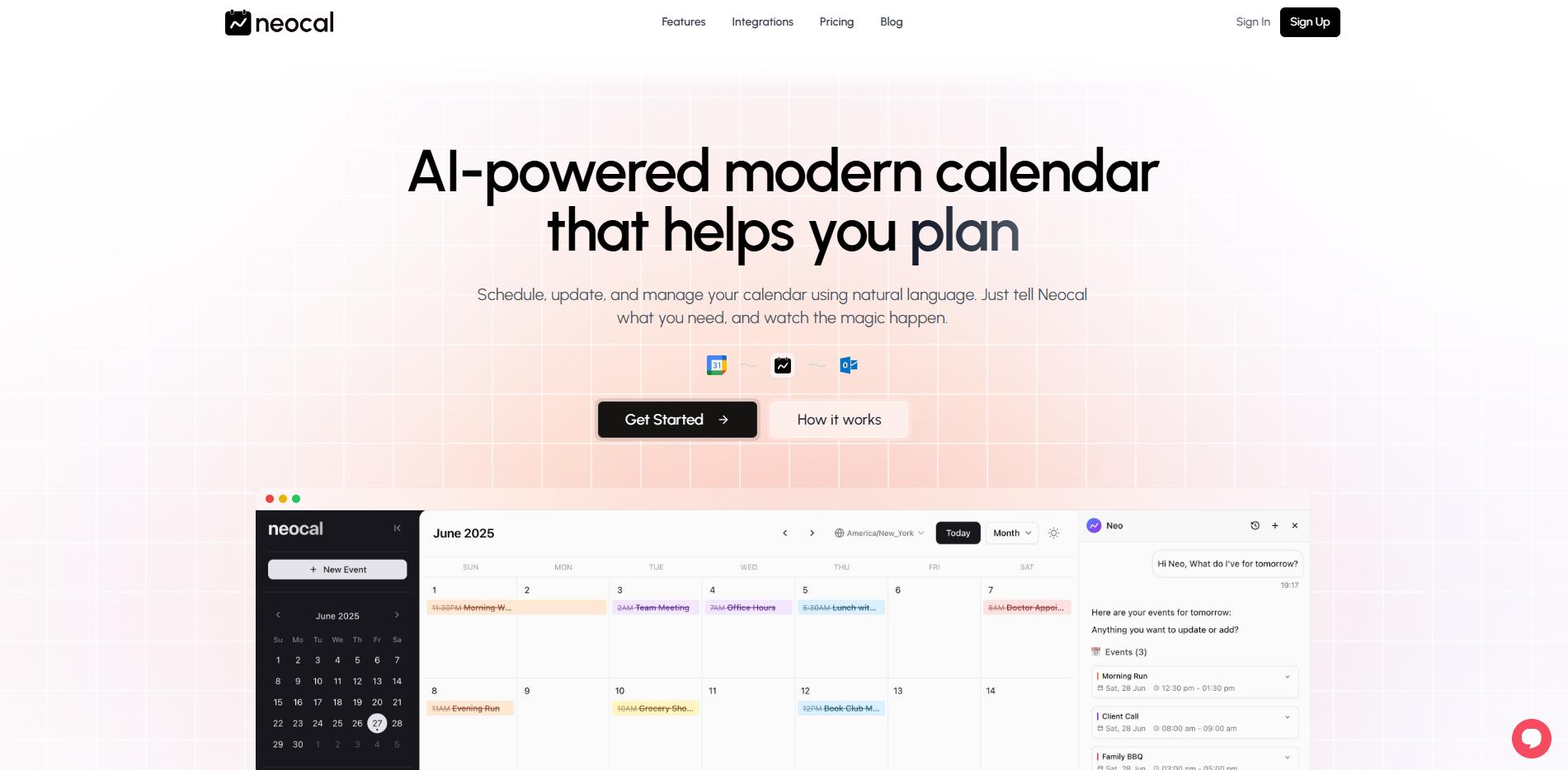
Natural Language Calendar Control: Schedule meetings and appointments by typing what you want in plain English. Just say “book a call with John next Friday at 2pm” and NeoCal creates the event instantly.
Smart Scheduling Assistant: Let NeoCal find the best meeting times that work for everyone. It checks your calendar for conflicts and suggests times that fit your preferences automatically.
Instant Schedule Answers: Ask questions about your calendar and get immediate responses. Find out when you’re free next week or what meetings you have tomorrow without clicking through multiple screens.
Automatic Time Zone Handling: Schedule meetings with people anywhere in the world without doing math. NeoCal converts time zones for you so a “3pm meeting” shows up correctly for everyone involved.
Quick Event Changes: Reschedule or cancel appointments with simple commands like “move my 2pm to 4pm” or “cancel tomorrow’s lunch.” No need to find and edit events manually.
Learning Your Patterns: NeoCal remembers how you like to schedule things and suggests times based on your habits. It knows if you prefer morning meetings or need buffer time between appointments.
Two-Way Google Calendar Sync: Keep all your calendars in one place with automatic updates. Changes you make in NeoCal show up in Google Calendar instantly, and vice versa.
WhatsApp Calendar Management: Control your schedule right from WhatsApp by sending messages. Text “what’s on my calendar today” and get your agenda without opening another app.
Our Take of NeoCal
NeoCal looks like a solid option for busy professionals who want to simplify their calendar management. The natural language feature is pretty neat – you can just type “Schedule lunch with Sarah next Tuesday” and it figures out the details. That’s a big time-saver compared to clicking through multiple screens.
The WhatsApp integration is smart too. Most people are already using WhatsApp throughout their day, so being able to manage your calendar without switching apps makes sense. The automatic time zone adjustments will be super helpful if you work with people in different locations.
What stands out is how it learns your scheduling preferences over time. If you always prefer morning meetings or need buffer time between calls, NeoCal picks up on these patterns and suggests times that work for you.
The main drawbacks? You can’t use voice commands yet, which would be nice when you’re driving or multitasking. And while the Google Calendar sync works well, some users want more control over data management features.
For small business owners who spend too much time coordinating schedules, NeoCal could cut down on the back-and-forth of finding meeting times. The setup is straightforward, and users report seeing better engagement after getting it running.
Bottom line: If natural language calendar management and WhatsApp integration sound useful to you, NeoCal is worth checking out. Just know that some features like voice control are still in development. The free trial lets you test if it fits your workflow before committing.
NeoCal's Pricing
Neocal is currently free to use with no monthly charges.
The free plan includes AI-powered calendar management, Google Calendar integration, unlimited events, scheduling links, and WhatsApp integration.
The company plans to introduce premium pricing options in the future, but for now all features are available at no cost.
Final Thoughts about NeoCal
So what’s the verdict? If you’re spending too much time on scheduling tasks that could be automated, NeoCal might be worth a shot. The natural language approach really does make calendar management feel less like a chore and more like texting a helpful assistant. Plus, the WhatsApp integration means you can handle your schedule without adding yet another app to your daily routine.
Think about how much time you waste each week just trying to find meeting times or updating your calendar. Even saving 15 minutes a day adds up to over an hour each week – time you could spend on actual work or with family. The free trial gives you a chance to see if it fits your workflow without any risk.
Ready to see if NeoCal can simplify your scheduling? Click the button below to give it a try.
NeoCal FAQs