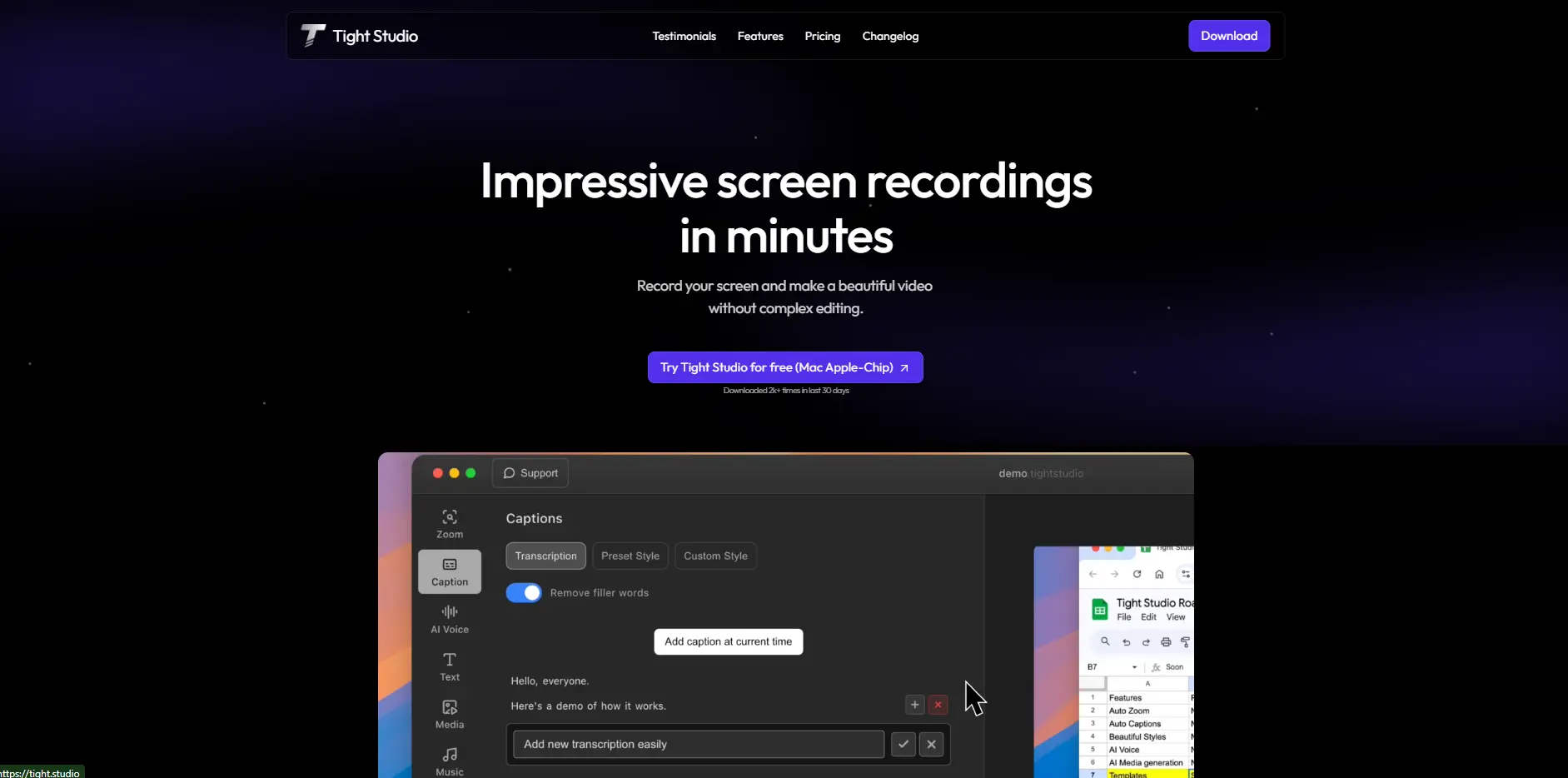
Tight Studio Introduction
Creating product demos that actually capture attention feels like trying to juggle while riding a unicycle. You're switching between recording software, editing tools, and trying to make everything look professional – all while your actual work piles up. If you've ever spent hours tweaking a simple screen recording just to make it presentable, you know exactly what I'm talking about.
Tight Studio promises to change that frustrating process. This Mac app turns screen recordings into polished product demos without requiring you to become a video editing expert. Think of it as your personal demo assistant that handles the technical stuff while you focus on showing off what your product can do.
For product managers rushing to get demos ready for stakeholder meetings, or marketers who need quick but professional-looking content for social media, this tool might be the answer to those late-night editing sessions. It automatically adds smart zooms to highlight important clicks, drops in professional captions, and even includes AI narration when you don't have time (or the right equipment) to record voiceovers yourself.
The real question is whether Tight Studio lives up to its promise of making demo creation fast and painless. Let's dig into what this tool actually does, who it works best for, and whether it's worth adding to your toolkit.
Tight Studio Key Features
Smart Zoom: Your demos automatically zoom in on the exact spots where you’re clicking or typing. No more viewers squinting at their screens trying to see what you’re doing – they’ll catch every important detail without you lifting a finger.
Professional Captions: Add sleek, pre-designed captions that match your brand in seconds. Your viewers get clear context for each step, and you look like you hired a professional video editor (even though it took you just a few clicks).
AI Narration: Get natural-sounding voiceovers without stepping into a recording booth. Perfect when your office is noisy or you don’t have fancy recording equipment – your demos will sound crisp and professional every time.
Background Music: Pick from their music library or upload your own tracks to set the perfect mood. Whether you want upbeat energy for a product launch or calm vibes for a tutorial, you control how your demo feels.
Our Take of Tight Studio
Creating product demos shouldn’t feel like you need a film degree. If you’re running a small business and need to show off your software or explain features to customers, Tight Studio makes the whole process pretty straightforward. The biggest selling point is how quickly you can go from recording your screen to having something professional-looking.
The automatic zoom feature is genuinely helpful – it picks up on where you’re clicking and moving, so viewers don’t miss the important stuff. And if you’re recording in a coffee shop or your home office with kids in the background, the AI voiceover feature could save your demo. You type what you want to say, and it creates a clean narration without background noise.
But here’s the thing – if your team uses Windows or Linux machines, you’re out of luck. It’s Mac-only right now, which could be a dealbreaker for many businesses. The customization options are also pretty basic. You get pre-designed caption styles and a set music library, but if you want complete creative control, you might feel limited.
For the price point and what it delivers, it’s a solid choice for Mac users who want to create demos fast without learning complicated software. Just make sure to check if it works with your current setup – the website doesn’t clearly spell out what apps or services it connects with. If you’re comparing options, tools like Loom or Camtasia offer more features but come with steeper learning curves and higher prices. Tight Studio sits in that sweet spot of being simple enough to use right away but professional enough for client-facing content.
Tight Studio's Pricing
Tight Studio offers a free plan and two paid subscription options for individual creators.
The Free plan costs $0/month and provides access to all core features, including zoom tools to engage audiences, automatic professional captions, video clipping tools, and background music. However, exports include the Tight Studio watermark, and AI voice or media generation features are not available.
The Starter plan costs $5/month and is designed for users who don’t need AI-powered tools but want professional, watermark-free exports. It includes all core features from the free plan — zoom, captions, video clipping, and background music — without the watermark limitation.
The Pro plan is priced at $20/month and is ideal for users who need full AI capabilities. It includes everything in the Free and Starter plans, plus AI voiceover and AI media generation. Subscribers receive 1,000 AI credits that reset each month.
All plans are available on a monthly or yearly basis, with the yearly option offering 3 months free.
Final Thoughts about Tight Studio
Creating product demos doesn’t have to eat up your entire day. If you’re tired of bouncing between recording tools and editing software just to show off your product, Tight Studio might be the solution you’ve been looking for. The automatic features like smart zoom and AI narration take care of the technical heavy lifting, so you can focus on what really matters – showing your customers why your product is worth their time.
Before you decide, think about your specific needs. Are you on a Mac? Do you need quick turnaround times for demos? Would having AI voiceovers help when your recording environment isn’t perfect? If you’re nodding yes to these questions, this tool could save you hours every week.
The real value here is in the time you get back. Instead of spending your evenings learning video editing or paying someone else to create demos, you could be improving your product or connecting with customers. That’s the kind of trade-off that actually moves your business forward.
Ready to see if Tight Studio fits into your workflow? Give it a try and see how much time you can save on your next product demo. Click the button below to get started.
Tight Studio FAQs