Falva Introduction
Creating visual content that actually looks professional can feel like a full-time job when you're trying to run a business. You know the struggle – spending hours in design tools just to make one social media post, then having to start from scratch for the next one because nothing matches your brand. Or worse, paying designers for every little thing you need.
What if you could create all your visual content in one place, keep everything on-brand automatically, and get it done in minutes instead of hours? That's exactly what Falva promises to do. It's an AI-powered design platform that launched in June 2025, and it's built for people who need professional-looking content fast but don't have time to become design experts.
The platform tackles a real problem – design work takes forever, and keeping everything consistent across your brand feels nearly impossible when you're using different tools for different tasks. Falva brings everything together in one workspace where you can go from rough ideas to finished designs without switching between a dozen different apps.
For business owners who are tired of the design bottleneck slowing down their marketing, this could be the solution you've been looking for. Let's dig into what Falva actually does and whether it lives up to its promises.
Falva Key Features
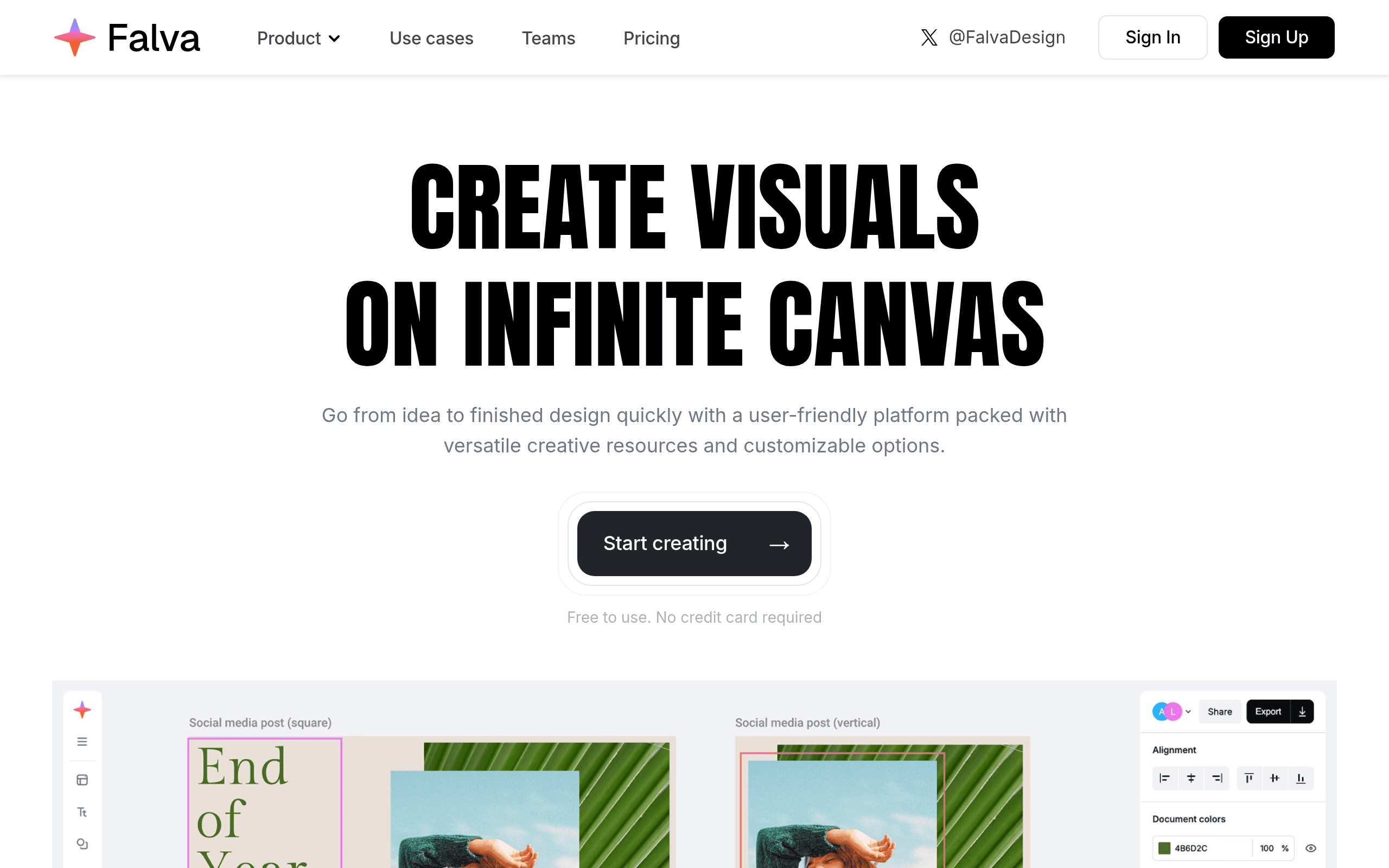
Infinite Canvas for Fluid Design: Work without boundaries on a space that grows with your ideas. You can map out entire projects, compare different versions side by side, and zoom from big-picture planning down to tiny details – all in one place.
Falva AI Creative Companion: Speed up boring tasks and spark new ideas with built-in AI tools. Generate images right on your canvas, create catchy copy in seconds, remove backgrounds instantly, and translate or rewrite text with just one click.
Comprehensive Brand Kit Management: Keep your brand looking consistent across every design and team member. Store up to 100 different brands’ logos, colors, and fonts in one central spot – perfect if you’re an agency or manage multiple product lines.
Real-Time Collaboration: Work together with your team on the same canvas at the same time. Everyone can contribute while staying within brand guidelines, making projects move faster and keeping everyone on the same page.
Advanced One-Click Export: Download all your files in the right sizes and formats with just one click. Set custom dimensions for each platform, rename your boards, pick multiple formats, and get everything you need at once – no more exporting the same thing over and over.
Our Take of Falva
Falva brings something fresh to the table for business owners who need professional design work without hiring a full creative team. The infinite canvas feature lets you work on multiple design ideas at once, which is perfect when you’re creating social media posts, website graphics, and marketing materials all in one sitting.
The AI tools are where things get interesting. You can generate images and write copy right on your canvas, which speeds things up when you’re stuck on ideas. The background removal tool alone could save you hours of work each month. If you’re managing different brands or product lines, the Brand Kit feature keeps everything organized in one place. You can store up to 100 different brand identities, complete with logos, colors, and fonts.
For teams, the real-time collaboration means your marketing person and designer can work together without sending files back and forth. Everyone sees changes as they happen, which cuts down on revision rounds and miscommunication.
The one-click export feature solves a real problem. You can set up custom sizes for Instagram, Facebook, your website, and email campaigns, then download everything at once. No more exporting the same design twenty times for different platforms.
Is it worth it? That depends on your current setup. If you’re using multiple tools for design, struggling to keep brand consistency, or spending too much time on revisions, Falva could simplify your workflow. The learning curve is there, but it’s not steeper than other professional design tools. Just remember you’ll need reliable internet since it’s all online.
For the price point compared to hiring freelancers or maintaining separate subscriptions for design, AI writing, and collaboration tools, Falva makes financial sense for growing businesses. It won’t replace a skilled designer for complex projects, but it gives you the tools to handle everyday design needs in-house.
Falva's Pricing
Falva is currently free to use with no credit card required.
The free plan includes unlimited canvases, customizable templates, content library access, advanced export options, Brand Kits, folders, and multiplayer collaboration features.
This appears to be a promotional “Free for now” offering, suggesting that paid tiers may be introduced in the future.
Users can start creating professional designs immediately with all core features available at no cost.
Final Thoughts about Falva
So there you have it – Falva could be the missing piece in your content creation puzzle. If you’re spending too much time fighting with design tools or watching your brand consistency slip through the cracks, it might be time to give this platform a shot.
Think about your current design workflow. How many hours are you losing each week to repetitive tasks? How often do you put off creating content because it feels like too much work? Those are the real costs of not having the right tools.
Falva won’t turn you into a professional designer overnight, but it will give you the power to create polished content that actually looks like it belongs to your brand. And when you can knock out a week’s worth of social media posts in an hour instead of a whole day, that’s time you can put back into growing your business.
The best part? You don’t have to take our word for it. See for yourself if Falva can transform your design process. Click the button below to start creating better content, faster.
Falva FAQs