Hypernote Introduction
Taking notes during meetings can feel like you’re trying to catch water with your bare hands. You’re either typing frantically and missing key points or paying attention but forgetting important details later. If your meetings involve sensitive info about clients or business strategies, you probably worry about where those notes end up when you use cloud-based tools.
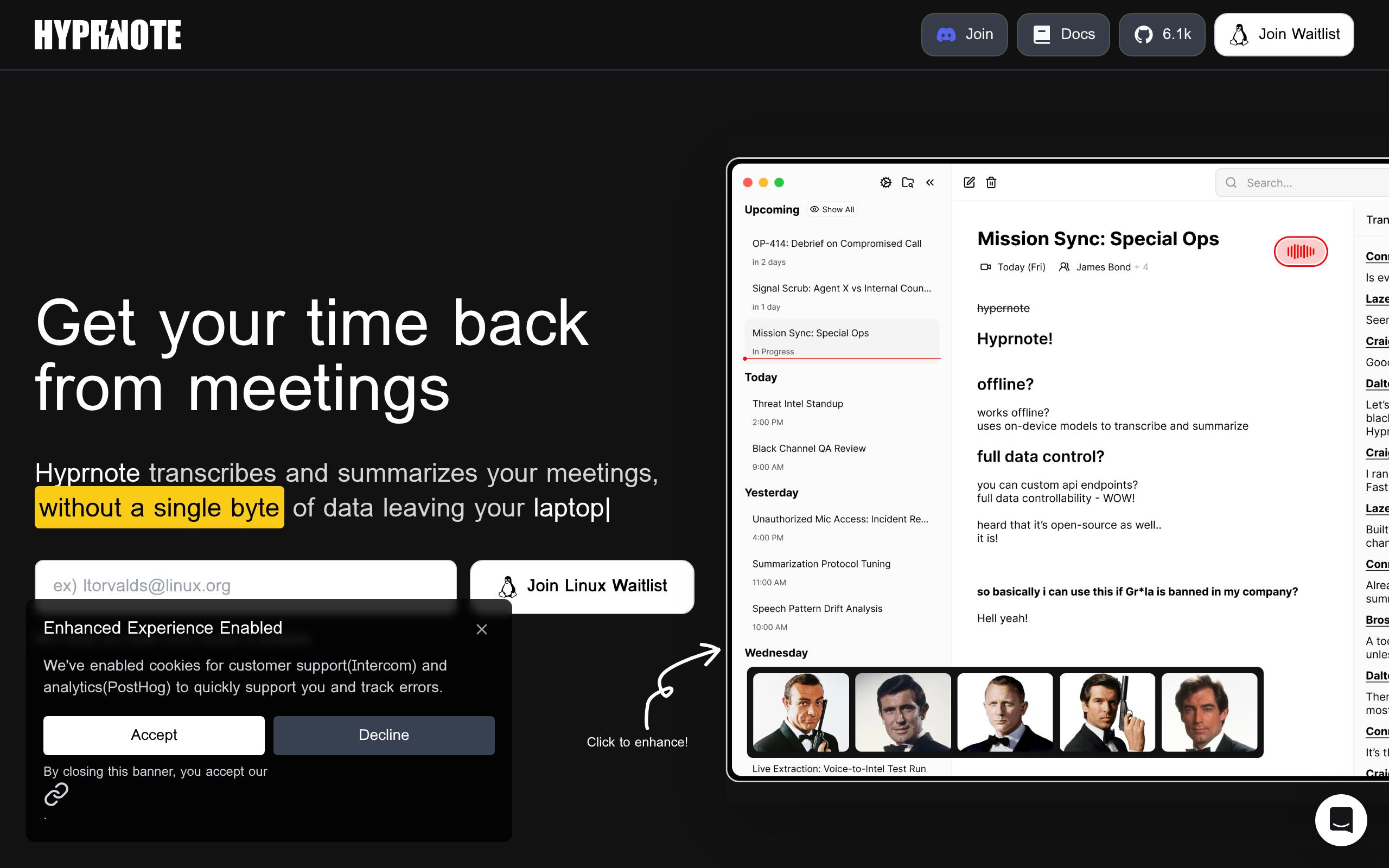
That's where Hyprnote comes in. This AI-powered note-taking app captures and summarizes your meetings right on your laptop, without sending a single byte of data to outside servers. Think of it as having a super-smart assistant sitting next to you who never shares your secrets.
Whether you're jumping between Zoom calls, Teams meetings, or even face-to-face discussions, Hyprnote quietly records and transcribes everything in the background.
The best part? It works without an internet connection, so you can capture every word even when your WiFi decides to take a coffee break.
For business owners who handle confidential information daily, this tool could be the solution to maintaining detailed meeting records without worrying about data security.
Let's take a closer look at what makes Hyprnote tick and whether it's worth adding to your productivity toolkit.
Hypernote Key Features
Local Processing: All your meeting notes and transcriptions stay right on your computer. Your sensitive business conversations never leave your device, so you don’t have to worry about data breaches or privacy issues.
Offline Functionality: Record and transcribe meetings even without internet access. You can capture important discussions during flights, in secure facilities, or anywhere connectivity is limited.
Multi-Platform Compatibility: Works seamlessly with Zoom, Google Meet, Microsoft Teams, Webex, Slack, and Discord. No need for bots joining your calls or extra plugins – it captures audio directly from your computer.
Automatic Summarization: Combines your typed notes with AI transcriptions to create clear meeting summaries. You’ll get the key points and action items without having to re-listen to entire conversations.
Our Take of Hypernote
If you’re running a business where client information needs to stay confidential, Hypernote could be exactly what you’ve been looking for. The fact that everything stays on your computer – no cloud uploads, no external servers – makes it stand out from pretty much every other meeting tool out there.
The biggest win here is peace of mind. You can record client calls, team meetings, or strategy sessions knowing that sensitive info isn’t floating around on someone else’s servers. For businesses in finance, healthcare, or any field with strict privacy rules, that’s huge.
What makes it practical is that it works with all the usual suspects – Zoom, Teams, Google Meet – without needing to install extra bots or plugins. You just fire it up and it captures the audio directly from your computer. No fuss, no complicated setup.
The offline feature is another plus. If you’re traveling or working somewhere with spotty internet, you can still record and transcribe meetings. That flexibility is something most cloud-based tools can’t offer.
But here’s the catch – it’s Mac only right now. If your team uses Windows or Linux, you’re out of luck. And you’ll need a fairly recent Mac too (macOS Sonoma 14.2 or newer), so older machines won’t cut it.
For small to medium businesses on Mac who handle sensitive information, Hypernote fills a real gap. The combination of strong privacy, easy integration, and offline capability makes it worth considering. Just make sure your whole team can actually use it before committing.
Hypernote's Pricing
Hyprnote offers a freemium pricing model with three tiers.
The Free plan provides unlimited transcripts and summaries with the option to connect your own speech-to-text models and language models. It also includes mic and speaker identification, calendar integration, meeting search, limited chat with meeting notes, limited custom templates, meeting notifications, ad-hoc meeting detection, and the ability to download the app.
The Pro plan costs $8 per month when billed monthly or $59 per year (equal to $4.92 per month). It includes everything in the Free plan plus unlimited chat, unlimited custom templates, configurable summary granularity, transcript annotations, floating recording controls, and auto-start or stop for ad-hoc meetings.
For larger organizations, an Enterprise plan is available with custom pricing. This tier includes everything in the Pro plan, plus 24/7 priority support, secure team note sharing, SSO with SAML 2.0 or OIDC, multi-factor authentication, advanced access management, smart consent management, a customizable UI with extensions, a custom admin dashboard builder, and a custom agent workflow builder.
The tool is currently available for macOS, with versions for Windows and mobile devices in development.
Final Thoughts about Hypernote
Running a business means protecting your clients’ trust above all else. If you’ve been searching for a way to capture meeting notes without worrying about where that information ends up, Hyprnote might be the solution you need.
The privacy-first approach sets it apart from other tools, particularly if you frequently work with confidential information.
Before making any decision, think about your specific needs.
Do you use Mac computers?
Does your team handle sensitive client data?
Are you comfortable with a tool that keeps everything local rather than backing up to the cloud?
These questions will help you figure out if Hyprnote fits into your workflow.
The free price tag makes it easy to test without any risk. You can download it, try it with a few meetings, and see if it actually makes your life easier. Just remember to check that your Mac meets the system requirements first.
If you’re ready to give Hyprnote a shot and see how it handles your meeting notes, click the button below to get started.
Hypernote FAQs