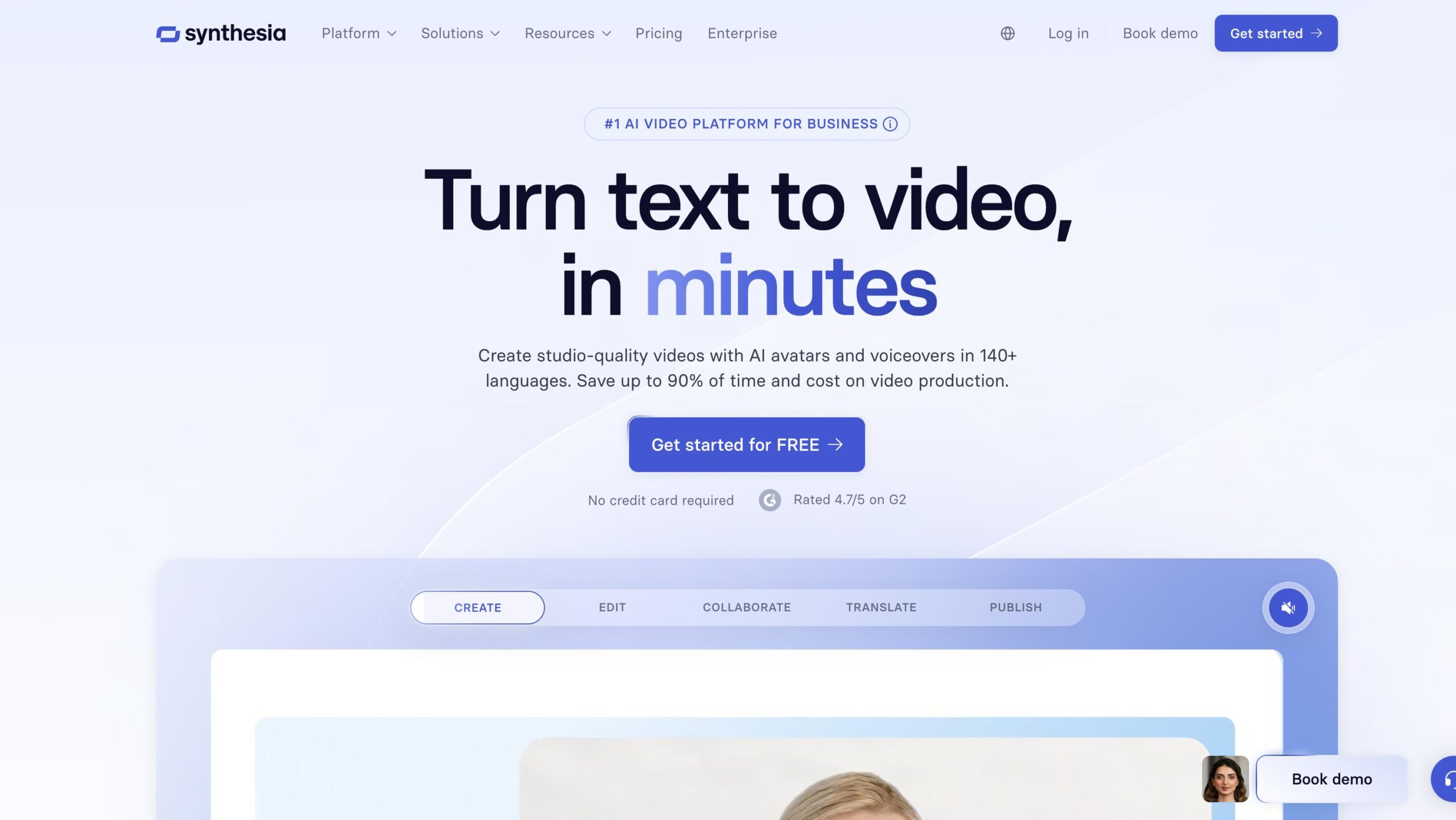
Synthesia Introduction
If you're tired of spending hours (and thousands of dollars) on video production, you're not alone. Most business owners know they need video content to stay competitive, but the traditional way of making videos is a huge headache. You need cameras, lighting, actors, editing software, and tons of time you probably don't have.
What if you could create professional videos by just typing? That's exactly what Synthesia promises to do. This AI tool lets you turn your written content into polished videos with realistic avatars speaking your words in over 140 languages. No cameras, no actors, no complex editing.
We've been testing Synthesia to see if it lives up to the hype. Can it really replace traditional video production? Is it worth the monthly cost? And what are the catches you should know about before signing up?
In this review, we'll break down everything about Synthesia – from how easy it is to use, to where it falls short. We'll show you exactly what you can expect if you decide to try it for your business.
Synthesia Key Features
AI Avatars: Choose from over 230 digital presenters to be the face of your videos. You’ll create professional content without hiring actors or stepping in front of a camera yourself.
Multilingual Support: Create videos in more than 140 languages with just a few clicks. You can reach customers worldwide without hiring translators or voice actors for each language.
Templates: Pick from 200+ ready-made video templates for different business needs. You’ll go from idea to finished video in minutes instead of starting from scratch every time.
AI Video Dubbing: Convert your existing videos into 29+ languages automatically. You can expand your content’s reach without re-recording everything from the beginning.
Collaboration Tools: Work with your team using shared workspaces, comments, and version control. You’ll keep everyone on the same page and avoid the back-and-forth of email attachments.
Integration: Connect your videos directly to your Learning Management System and other tools. You can share training content where your team already works without switching between platforms.
Our Take of Synthesia
If you’re running a small business and need to create videos without hiring a film crew, Synthesia could save you serious time and money. You just type what you want the avatar to say, pick from their collection of digital people, and boom – you’ve got a professional-looking video.
The real strength here is how fast you can pump out content. Need a quick training video for new employees? Done in 20 minutes. Want to explain your product in Spanish, French, and German? No problem – they support over 140 languages. For businesses trying to reach customers around the world, that’s huge.
But let’s be real about what you’re getting. These avatars look pretty good, but they’re not going to fool anyone into thinking they’re real people. Some folks find them a bit stiff or robotic. If you’re hoping for Oscar-worthy performances, this isn’t it.
The customization limits might frustrate you too. Want to make your avatar wear your company’s exact uniform? Can’t do it unless you’re on the pricier plans. They also block certain words and phrases, which can be annoying if you’re in an industry with specific terminology.
Here’s something that might give you pause – once you buy a subscription, there’s no getting your money back. So if you sign up and realize it’s not what you expected, tough luck. That’s why starting with their free trial makes sense before committing any cash.
For most small business owners, the time savings alone make Synthesia worth considering. Instead of spending thousands on video production or hours fumbling with complicated editing software, you can create decent videos in minutes.
Just go in with realistic expectations about what AI-generated avatars can and can’t do, and you’ll probably find it useful for training materials, product demos, and basic marketing content.
Synthesia's Pricing
Synthesia offers a free Basic plan with 3 minutes of video per month, featuring 1 editor seat and 9 AI avatars. The Starter plan costs $18/month when billed annually ($29/month if billed monthly) and includes 10 minutes of video monthly, 125+ AI avatars, video downloads, AI Video Assistant, and AI Dubbing capabilities.
The Creator plan is priced at $64/month annually ($89/month monthly) with 30 minutes of video per month, 180+ AI avatars, 5 personal avatars, branded video pages, API access, and interactive video features.
The Enterprise plan offers custom pricing with unlimited video minutes, no duration limits, 230+ AI avatars, unlimited personal avatars, SAML/SSO, live team collaboration, brand kits, and SCORM export functionality.
All paid plans include features like 140+ languages and voices, auto-generated closed captions, background music, voiceover uploads, and PowerPoint import capabilities. Video minutes are consumed only when videos are generated, not during editing, and unused minutes don’t roll over to the next month.
Annual plans include additional benefits such as personal avatar creation, with Starter and Creator plans offering 3 and 5 personal avatars respectively. Studio avatars are available as a paid add-on for $1,000/year. The platform uses a credit system where credits serve as the shared currency for usage-based features across all plans.
Final Thoughts about Synthesia
Bottom line – if you’re spending too much time and money on video creation, Synthesia is worth a look. You won’t get Hollywood-quality productions, but you will get videos that work for your business without the usual hassle.
Think about how many videos you could create if each one only took 30 minutes instead of days. Training videos, product demos, customer testimonials, social media content – all the stuff you’ve been putting off because traditional video production is such a pain.
The free trial lets you test everything before spending a dime. Create a few videos, see how they look, and decide if this fits your needs. Just remember what we covered – the avatars aren’t perfect, customization has limits, and you can’t get refunds. But for most businesses, the time and money you’ll save makes those trade-offs worth it.
Ready to see if Synthesia works for you? Click the button below to start your free trial and create your first AI video today.
Synthesia FAQs