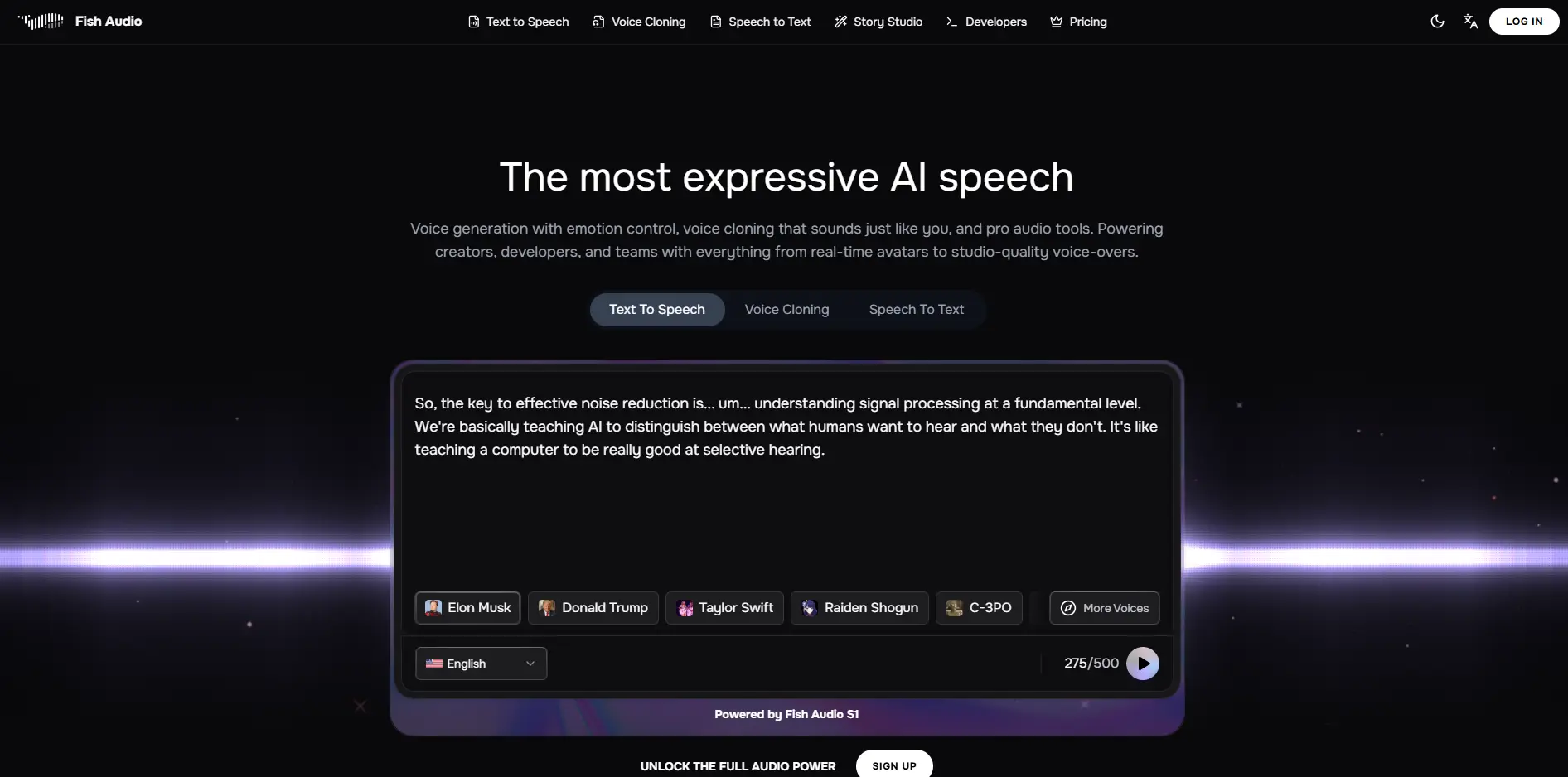
Fish Audio Introduction
Ever felt like you're spending way too much time and money trying to create professional voiceovers for your business?
You're not alone. Whether you need narration for training videos, want to turn your blog posts into podcasts, or create engaging social media content, hiring voice actors can quickly drain your budget.
That's where Fish Audio comes in. This AI voice generation tool promises to transform your text into natural-sounding speech in over 70 languages, and even clone voices with just a few minutes of audio. But does it actually deliver on these big claims? Let's find out if Fish Audio is worth your time and money, or if it's just another tool that sounds better than it performs.
Fish Audio Key Features
Text-to-Speech (TTS): Convert your written content into natural-sounding speech with over 1,000 voices in 70+ languages. Create professional voiceovers for videos, presentations, or customer service without hiring voice actors.
Voice Cloning: Replicate your own voice or create custom voices with just a few minutes of audio. Build consistent brand voices for all your content while saving hours of recording time.
Speech-to-Text: Turn spoken words into written text automatically. Speed up content creation by dictating ideas or quickly transcribing meetings and interviews.
Story Studio: Create complex audio projects like audiobooks or training materials with precise control over pacing and emotion. Bring your written content to life without expensive studio time.
Developer API: Connect Fish Audio’s voice technology directly to your apps and websites. Scale your voice content production automatically as your business grows.
Our Take of Fish Audio
Fish Audio caught our attention as a voice generation tool that strikes a nice balance between quality and price. For small business owners who need to create audio content regularly, this could be a solid choice. The platform produces voices that sound pretty natural, and you get access to over 1,000 voice options across 70+ languages. That’s helpful if you’re creating content for different markets or want variety in your projects.
What makes Fish Audio stand out is how easy it is to use. You don’t need to be tech-savvy to get started. The interface is straightforward, and if you’re more technical, they offer an API that lets you integrate their voice generation into your own apps or workflows. The voice cloning feature is particularly interesting – you can create a digital version of your voice with just a small sample, which could save tons of time for regular content creators.
Price-wise, Fish Audio sits in a comfortable spot. It’s not the cheapest option out there, but it’s more affordable than premium competitors while still delivering good quality. For businesses watching their budget, this makes it worth considering.
However, we did notice some red flags. Several users report that the platform doesn’t always deliver on its promises. Some say they got fewer characters processed than advertised, which could throw off your budget calculations. Customer support seems to be hit or miss too, with some users struggling to get help when they need it. The free plan is pretty limited, so you’ll likely need to pay to really test if it works for your needs.
For business owners considering Fish Audio, it comes down to your specific needs. If you need reliable, high-volume voice generation with excellent support, you might want to look at more established alternatives. But if you’re looking for good quality at a reasonable price and can work around occasional hiccups, Fish Audio could work well for you. Just go in with realistic expectations and maybe start with a smaller plan to test the waters first.
Fish Audio's Pricing
Fish Audio offers three pricing tiers with both monthly and annual billing options.
The Free Tier provides 8,000 credits monthly, allowing up to 7 minutes of highest quality S1 generation with a 500-character limit per generation.
The Plus Plan costs $20 monthly or $132 annually ($11/month), offering 250,000 credits for up to 200 minutes of S1 generation or 400 minutes of v1.5/v1.6 generation monthly, with support for up to 15,000 characters per generation, enhanced voice cloning, commercial use rights, and API access.
The Pro Plan is priced at $150 monthly or $900 annually ($75/month), providing 2,000,000 credits for up to 27 hours of S1 generation or 54 hours of v1.5/v1.6 generation monthly, supporting up to 30,000 characters per generation, along with enhanced voice cloning, commercial use rights, and API access.
Annual billing saves 33% compared to monthly rates. Credits reset monthly and do not roll over. Commercial use is restricted to paid plans only.
Final Thoughts about Fish Audio
Bottom line: Fish Audio offers a practical solution for businesses that need quality voice content without the huge price tag. While it’s not perfect, it delivers solid results for most everyday voice generation needs. If you’re tired of recording the same scripts over and over, or paying voice actors for every little project, this tool could save you both time and money.
Before you jump in with both feet, consider starting with a smaller plan to test how well it fits your workflow. Pay attention to the character limits and make sure the voices match your brand’s personality. And if you run into any issues, be prepared to be patient with support.
The real question is whether the time and money you’ll save outweighs the occasional technical hiccup. For many businesses, especially those creating regular audio content, the answer is yes. Fish Audio won’t replace professional voice actors for your most important projects, but it’s perfect for the everyday stuff that eats up your budget.
Ready to see if Fish Audio works for your business? Give it a try and create your first AI voiceover in minutes. Click the button below to get started.
Fish Audio FAQs