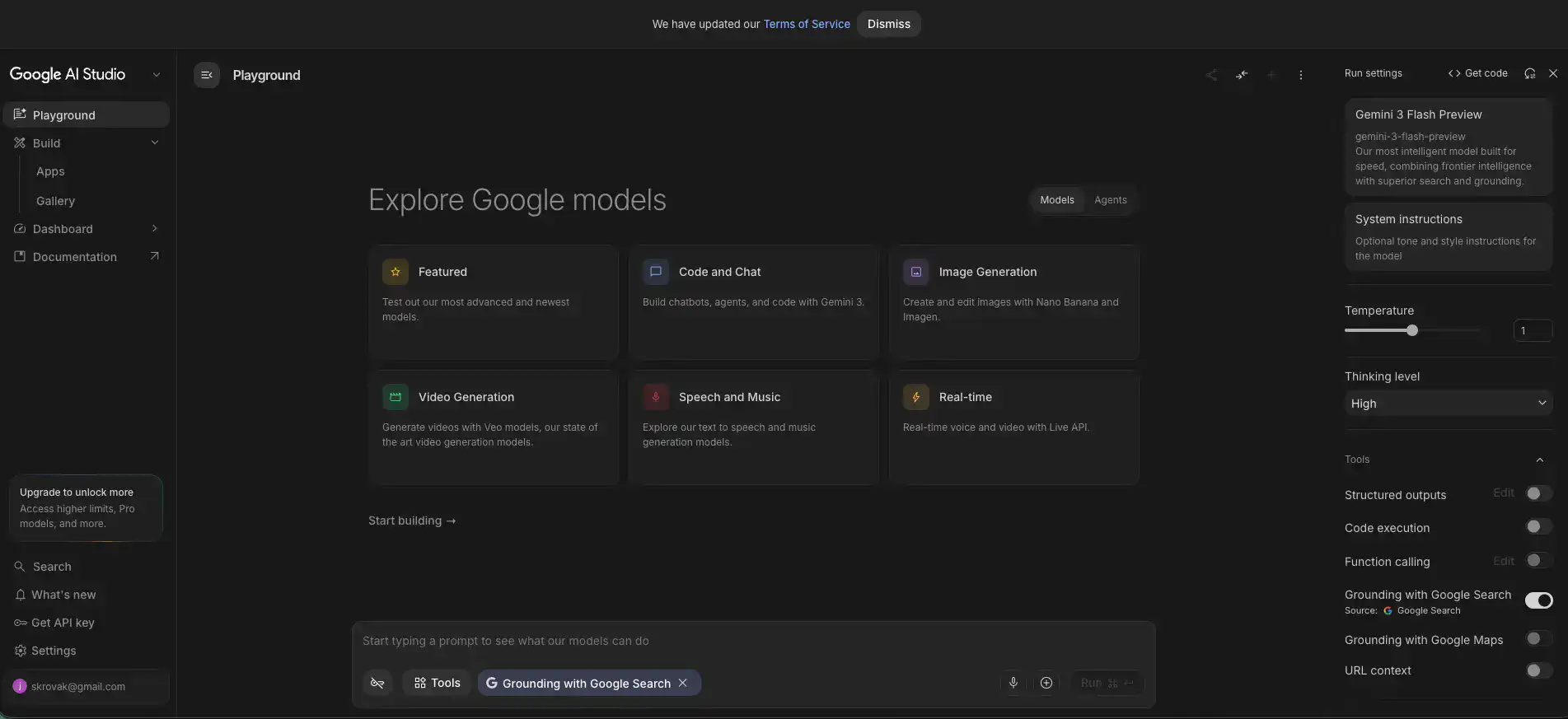
Google AI Studio Introduction
So you've been hearing about AI and wondering how to actually use it in your business without spending a fortune or hiring a team of engineers.
That's a pretty common spot to be in right now. Most AI tools either cost too much, feel too complicated, or both. Google AI Studio is Google's answer to that problem. It's a free, web-based platform that lets you play around with their Gemini AI models, build quick prototypes, and even plug AI features into your own apps. Sounds great on paper, right?
But here's the thing. Free tools always come with trade-offs, and you deserve to know what those are before you invest your time. We spent a good amount of time digging into Google AI Studio to figure out who it's really for, what it does well, and where it falls short.
If you're a small or medium business owner trying to figure out whether this tool is worth your attention, you're in the right place. Let's get into it.
Google AI Studio Key Features
Prompt Playground: Test and tweak your prompts in real-time and see how the AI responds right away. It’s a fast way to figure out what works before you commit to building anything.
Model Tuning: Train Gemini models on your own data so they give you better results for your specific needs. Great for when the out-of-the-box responses aren’t quite hitting the mark.
API Access: Connect Gemini models to your own apps and tools with simple API calls. This makes it easy to add AI features to whatever you’re already building without starting from scratch.
Multimodal Capabilities: Work with text, images, audio, and video all in one place. You can build AI apps that handle different types of content without switching between platforms.
No-Code App Builder: Create working AI prototypes without writing a single line of code. If you’ve got an idea but don’t have a dev team on standby, this is where you’ll want to start.
Our Take of Google AI Studio
If you’re a small or medium business owner who’s been curious about AI but didn’t want to spend a fortune figuring it out, Google AI Studio is worth a look. It’s free to get started, and the generous free tier means you can test things out without pulling out your credit card. The prompt playground makes it easy to experiment with Google’s Gemini models, and the no-code app builder lets you prototype ideas fast, even if you’re not a developer.
That said, there are some things to keep in mind. If you’re on the free tier, your data could be used for model training, which might be a dealbreaker if you’re working with sensitive customer info or proprietary business data. Some users have reported the interface getting sluggish after extended sessions, and there have been complaints about incomplete code generation, which can eat up time and tokens.
The biggest thing to understand is that Google AI Studio is really built for experimenting and prototyping. It’s not a full production solution. If you get to the point where you need tighter privacy controls, better governance, or more scalability, you’d likely need to move over to something like Google Vertex AI, which is a bigger commitment in terms of cost and complexity.
For businesses already plugged into Google’s ecosystem, the integration feels natural and smooth. If you’re using Google Cloud services, Workspace, or other Google tools, AI Studio fits right in without a lot of friction.
The bottom line is this. Google AI Studio is a solid starting point for testing AI ideas and building quick prototypes. It’s accessible, easy to use, and won’t cost you anything to get going. Just don’t expect it to be your long-term production platform. Think of it as the place where you figure out what works before you invest in something bigger.
Google AI Studio's Pricing
Google AI Studio is free to use, providing access to Google’s Gemini models directly in the browser.
Users can experiment with prompts, tune models, and build AI-powered applications at no cost. The platform offers generous rate limits for prototyping and development, including access to models like Gemini 1.5 Pro and Gemini 1.5 Flash.
For production-level usage or higher rate limits, users can integrate with the Gemini API through Google Cloud’s Vertex AI, which follows a pay-as-you-go pricing structure based on input and output tokens. Additional details on API pricing tiers and token-based costs are available through Google Cloud’s pricing documentation.
Final Thoughts about Google AI Studio
So here’s where you stand. Google AI Studio gives you a real chance to test out AI without spending a dime or needing a computer science degree.
It’s a great place to start if you’ve been sitting on the sidelines wondering whether AI could actually do something useful for your business. You can jump in, play around with prompts, build a quick prototype, and see what sticks.
The free tier is generous enough that you can get a solid feel for what’s possible before you ever have to think about upgrading or switching to something more production-ready. But like any free tool, go in with your eyes open.
Know the privacy trade-offs on the free plan, and don’t expect it to be your forever solution if you’re planning to scale something big. Think of it as your testing ground, the place where good ideas get their first real shot. If something clicks, you can always level up from there.
The best move you can make right now is to stop wondering and start trying. Give it a spin and see what AI can actually do for your business. If you’re ready to check it out for yourself, click the button below to get started with Google AI Studio.
Google AI Studio FAQs