Palette.fm Introduction
Got a box of old family photos sitting in your closet? Maybe some black-and-white shots of your grandparents or vintage pictures from decades ago?
There's something special about those images, but let's be honest, they can feel a bit distant when they're missing all that color. You might've thought about bringing them to life, but the idea of learning complex editing software or hiring a professional probably stopped you cold.
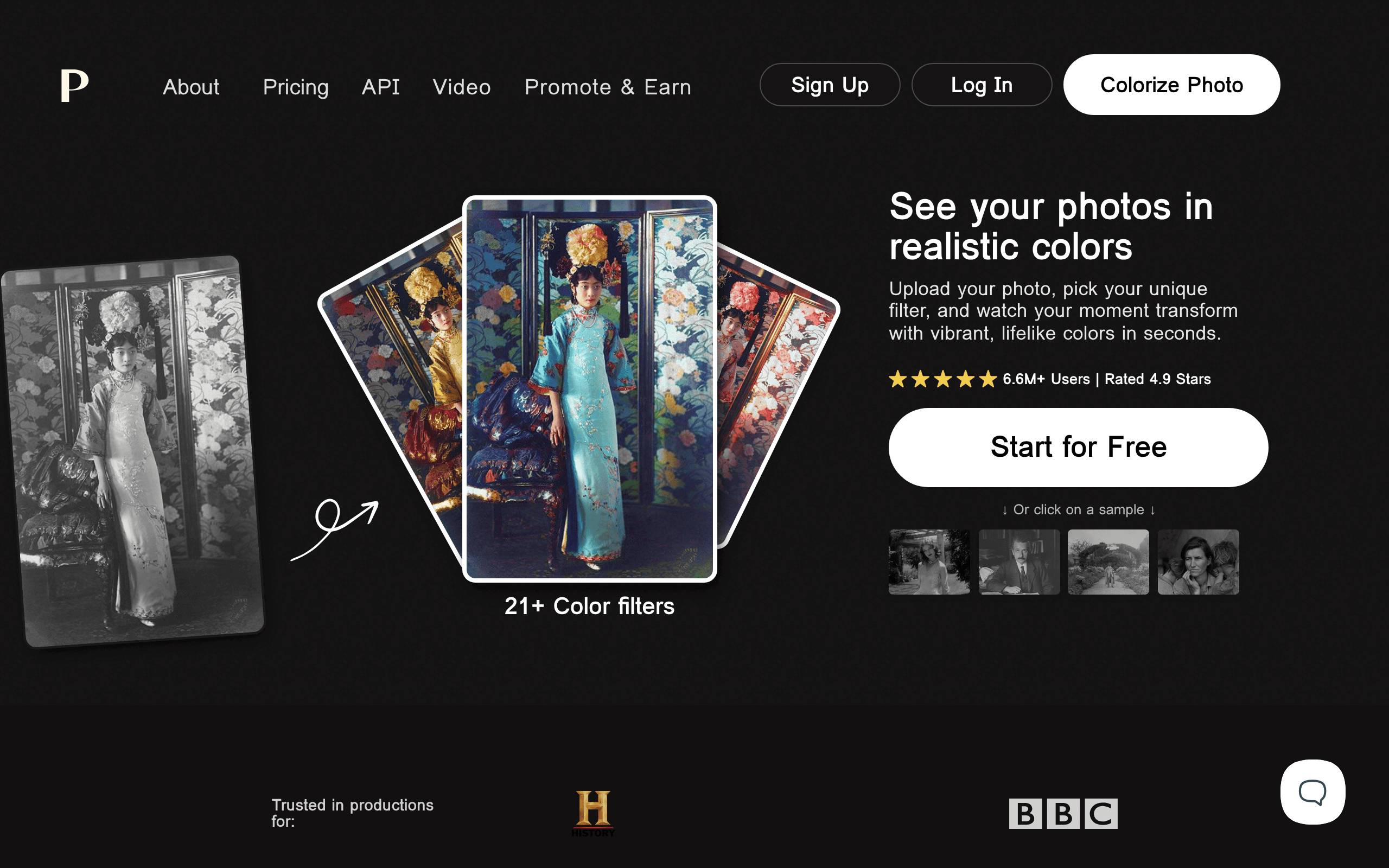
That's where Palette.fm comes in. This AI tool takes your old black-and-white photos and videos and adds realistic color in just a few clicks.
No fancy skills needed. Whether you're trying to restore family memories, create content for your business, or just see what grandma's wedding dress actually looked like, this tool might be exactly what you've been looking for.
Let's take a closer look at what Palette.fm can do and whether it's worth your time.
Palette.fm Key Features
AI-Powered Colorization: Transform your old black-and-white photos into full-color images in seconds. The smart technology picks colors that look natural and fit the scene, so your vintage family photos come to life without any guesswork on your part.
Customizable Color Palettes: Choose from over 21 color filters to get the exact look you want. You can pick preset styles or tweak colors yourself, giving you full control over how your final image turns out.
Bulk Image Processing: Colorize multiple photos at once instead of one at a time. This saves you hours when you’re working through old photo albums or large collections of archived images.
High-Resolution Outputs: Export your colorized images up to 5000×5000 pixels without losing quality. Your photos will look crisp and detailed whether you’re printing them or sharing them online.
Video Colorization: Bring old black-and-white video footage into the modern age with full color. Perfect for family movies, historical clips, or any vintage video content you want to refresh.
API Integration: Connect Palette.fm’s colorization technology to your own apps or services. Developers can build custom solutions without starting from scratch, making it easy to add colorization features to existing projects.
Our Take of Palette.fm
If you’re a small business owner looking to breathe new life into old photos, Palette.fm could be worth checking out. The tool does a solid job of turning black-and-white images into color ones without making you jump through hoops. You don’t need to be tech-savvy to use it, which is a big plus when you’re already wearing a dozen hats running your business.
The AI handles most of the heavy lifting, and you can process multiple images at once. That’s helpful if you’ve got a stack of vintage photos you want to use for marketing or social media content. The high-resolution outputs mean your colorized photos won’t look fuzzy or cheap.
That said, there are some things to keep in mind. The AI picks the colors for you, so what you get might not always match what you had in mind. If you’re working with historical photos where accuracy matters, you might end up with some colors that don’t quite fit the time period. Some users have noticed that fine details can get a bit lost in the process too.
When you stack it up against similar tools, Palette.fm holds its own with its mix of easy-to-use features and quality results. The API option is nice if you want to connect it with other apps you use. For most small business needs like sprucing up old company photos or creating nostalgic content, it gets the job done without a steep learning curve.
Palette.fm's Pricing
Try it for free with $0—sign up and receive 1 free trial credit, unlimited color previews, access to over 21 color filters, and full color customization.
Free previews include a watermark, lower resolution, and ads. For our Most Popular option, subscribe for $72/year (just $6/month or $0.15 per credit) and save $883, with up to 480 credits per year, faster processing, watermark-free previews, pro features and workflows, no ads, and all free benefits included. Prefer a one-time purchase?
Pay once for $49 and get 75 credits (available for 2 years) at $0.65 per credit, save $100, enjoy limited ads, and keep all free benefits.
Final Thoughts about Palette.fm
Those old photos sitting in your closet aren’t doing anyone any good collecting dust. Palette.fm gives you a simple way to bring them back to life without spending hours learning complicated software or paying someone else to do it for you.
Is it perfect? No. The AI makes its best guess at colors, and sometimes those guesses won’t match what you had in mind. But for most people who just want to see their family history in color, it does the job well.
Think about what you could do with colorized versions of those vintage shots. Share them at the next family gathering. Post them on social media. Print them out and hang them on your wall. There’s something powerful about seeing the past in full color that makes it feel more real and connected to today.
If you’re curious about what your old photos could look like, give it a shot. You might be surprised at what you discover. Click the button below to try Palette.fm and see your memories in a whole new way.
Palette.fm FAQs