Colossyan Introduction
Let's be real. Making training videos the old-school way is expensive, slow, and a total headache.
You've got to book studios, hire actors, deal with retakes, and then do it all over again when you need the same content in another language.
It's a lot. And if you're running a small or mid-size business, that budget just isn't there. That's where Colossyan comes in.
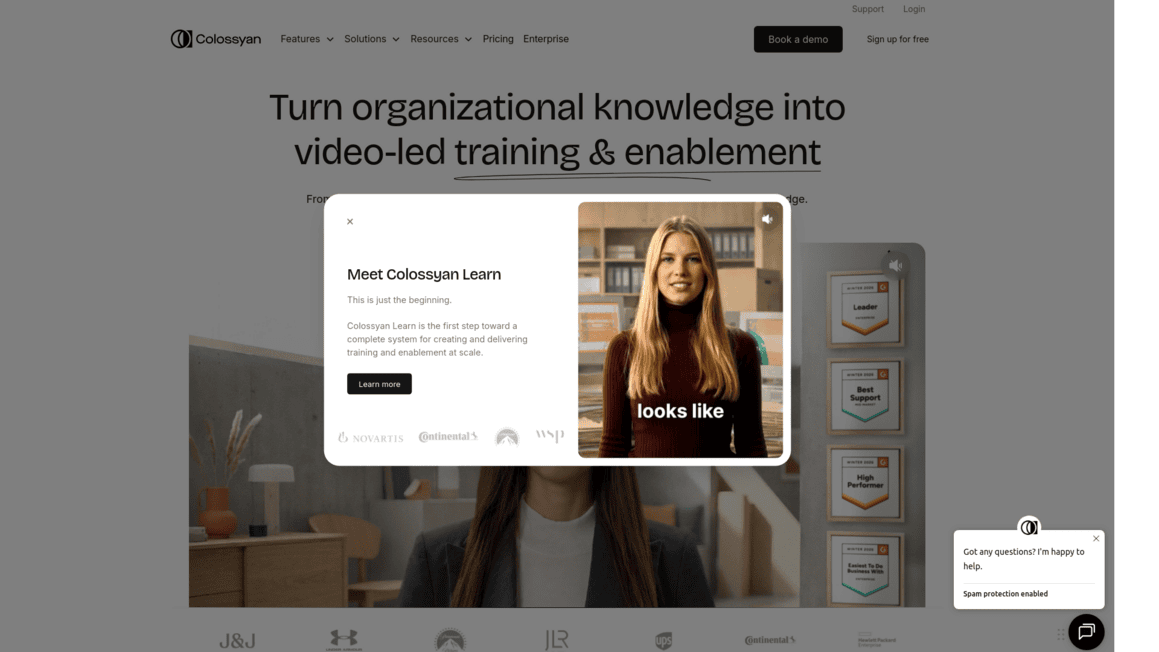
It's an AI video platform that lets you turn plain text into professional-looking training videos with AI presenters who look and sound like real people. No cameras, no crew, no stress.
You can even translate your videos into over 80 languages with a few clicks. In this review, we'll break down what Colossyan does well, where it falls short, and whether it's the right fit for your team.
Colossyan Key Features
AI Video Creator: Turn your text, PDFs, and documents into professional videos with AI avatars. You don’t need a camera, studio, or actors — just paste your content and get a polished video ready to share.
PPT Import: Pull your PowerPoint slides straight into Colossyan and turn them into videos. It’s a fast way to breathe new life into presentations you’ve already built.
Screen Recorder: Record your screen, edit the footage, and add narration all in one place. Great for making step-by-step tutorials without bouncing between different apps.
AI Avatars and Voiceovers: Pick from over 600 AI voices and a wide range of AI presenters to match your brand’s style. Your videos feel personal and professional without hiring talent.
Auto Translation: Translate your videos into over 80 languages with one click. If you’ve got a global team or customers in different countries, this saves you a ton of time and money on localization.
Interactive Video and SCORM Export: Add clickable elements to your videos so viewers can interact with the content. Then export in SCORM format to plug right into your Learning Management System — no tech headaches required.
Our Take of Colossyan
If you’re a small or mid-sized business owner who needs training videos but doesn’t have the budget for a full production crew, Colossyan is worth a serious look. It lets you turn text, PDFs, and even PowerPoint slides into professional-looking videos with AI avatars doing the talking. You don’t need a camera, a studio, or any video editing experience to get started.
The platform supports over 80 languages, which is a big deal if you’ve got a team spread across different countries. And because it exports in SCORM format, you can plug your videos right into most Learning Management Systems without any headaches.
That said, it’s not perfect. Some users report a bit of a learning curve when they first jump in, and if your computer isn’t particularly strong, you might run into some performance issues. The AI avatars and voices are impressively realistic, though, and for the price you’d pay compared to hiring actors or renting studio space, the savings add up fast.
It’s not going to replace a high-end video production team for something like a brand commercial, but for internal training, onboarding, and educational content, it does a solid job at a fraction of the cost.
Colossyan's Pricing
Colossyan offers a Free plan with 3 minutes of video, 20+ stock AI avatars, and 1 editor seat.
The Starter plan costs $19 per month when billed annually or $27 per month on a monthly basis, including 15 minutes of video per month, 70+ stock AI avatars, 3 custom avatars, 1 voice clone, unlimited viewers, and multiple avatar conversations with a maximum video duration of 5 minutes.
The Business plan starts at $70 per month billed annually or $88 per month on a monthly basis for 1 editor, with options for up to 3 editors. It includes unlimited video minutes on the NEO 1 model, 10 minutes per month on the advanced NEO 2 model, 170+ stock AI avatars, 10 custom avatars and 2 voice clones per editor, 4 interactive videos per month, 10 auto translations per month, videos up to 30 minutes long, and up to 25 scenes per video.
The Enterprise plan offers custom pricing with unlimited features including unlimited video minutes, unlimited translations, 200+ stock AI avatars, brand kits, SAML and SSO, SCORM export, a dedicated customer success manager, 24/7 on-call support, Ultra HD 4K video downloads, team permissions, custom share pages, and a multilingual player. Annual billing provides a 30% discount compared to monthly pricing.
Studio custom avatars are available as an add-on for $1000 per year, and additional enterprise add-ons include dedicated data centers, video creation support, API access, and branded templates.
Final Thoughts about Colossyan
So here’s the bottom line. If you’re spending too much time and money on training videos, or you’ve been putting them off because the whole process feels overwhelming, Colossyan gives you a real shortcut.
It’s not flawless, and it won’t replace a full creative agency for your next big brand campaign. But for getting solid training content out the door fast, in dozens of languages, without blowing your budget, it does the job well.
Think about what you’re spending right now on video production, or what it’s costing you to not have those training materials at all.
That’s the real comparison. If you’ve got a growing team, onboarding to handle, or customers around the world who need clear how-to content, this tool can save you real time and real dollars.
The best way to know if it fits your workflow is to try it yourself. Click the button below to take Colossyan for a spin and see what it can do for your business.
Colossyan FAQs