Adobe Firefly Introduction
If you're running a small or medium-sized business, you know how much time and money go into creating content.
Photos, videos, graphics — it all adds up fast. And if you're not a designer, getting things to look professional can feel like a full-time job on top of your actual full-time job.
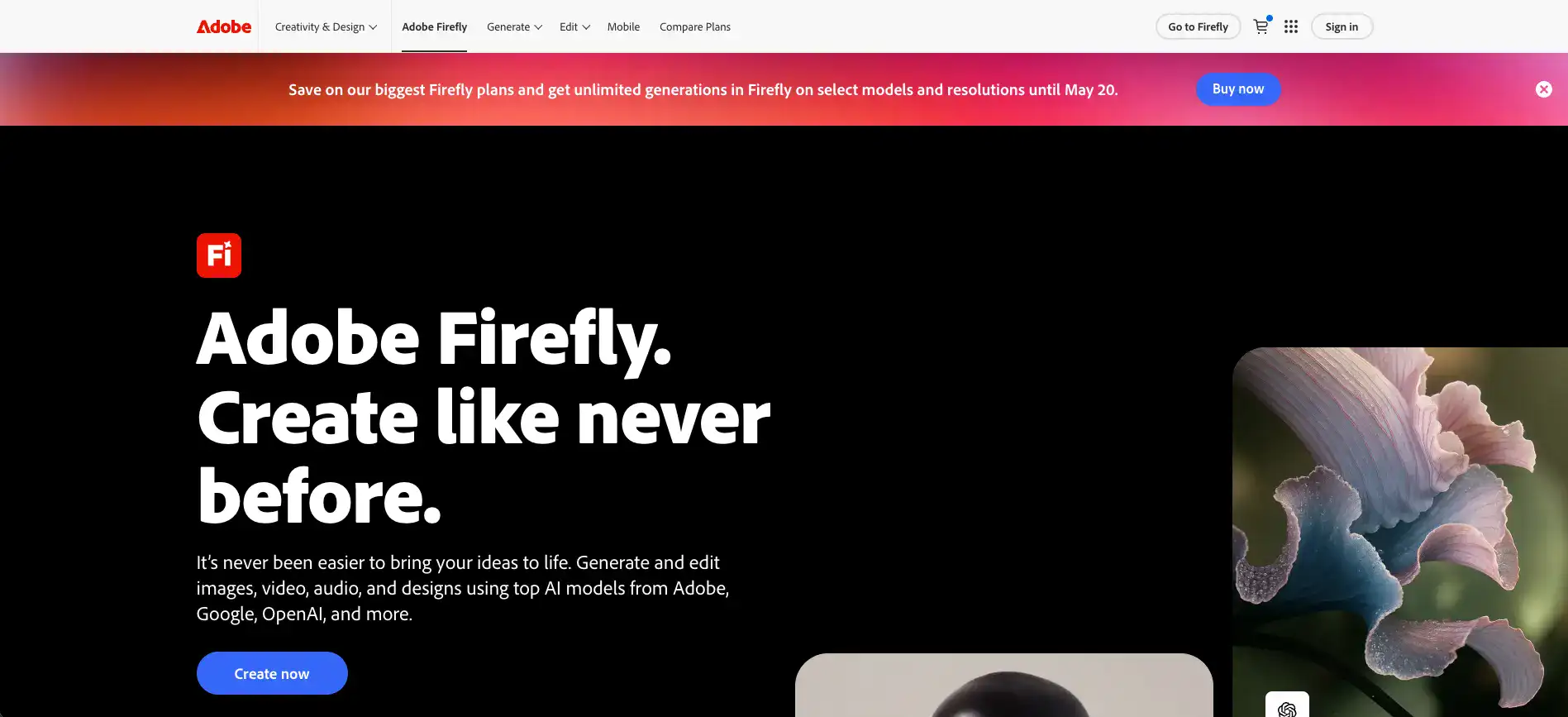
That's where AI tools come in, and Adobe Firefly is one of the biggest names in the space right now. It's a generative AI platform that lets you create images, videos, audio, and designs using simple text prompts.
Think of it like having a creative assistant who works at the speed of your ideas. Firefly launched in April 2025 and it's already making waves because it plugs right into Adobe's creative apps — the same ones millions of people already use every day. But is it actually worth your time and money?
We spent time putting it through its paces so you don't have to guess. Here's what we found.
Adobe Firefly Key Features
Text-to-Image Generation: Turn your ideas into visuals just by typing what you want. Describe a scene, a product concept, or a social media graphic, and Firefly creates an image for you in seconds — no design skills needed.
Text-to-Video Generation: Create videos from simple text prompts or still images. You get control over visual styles and camera movements, so you can produce polished video content without hiring a videographer or learning complex editing software.
Audio Translation: Translate your audio and video clips into multiple languages while keeping the original voice and tone intact. Great for reaching new audiences without re-recording everything from scratch.
Firefly Boards: Brainstorm and build moodboards with your team using an AI-powered workspace. You can explore ideas fast, drop in generated concepts, and get everyone on the same page before a single final asset is made.
Custom Models: Train Firefly to match your brand’s look and feel. This means every piece of content it generates stays consistent with your style guidelines — so your social posts, ads, and marketing materials all look like they came from the same team.
Adobe Ecosystem Integration: Firefly works right inside the Adobe apps you’re probably already using, like Photoshop and Illustrator. That means you don’t have to bounce between platforms or learn a whole new tool — it just fits into the way you already work.
Our Take of Adobe Firefly
If you’re a small-to-medium business owner who already lives inside the Adobe ecosystem, Firefly is worth a serious look. It pulls together AI tools for images, video, audio, and design all in one place, which means you’re not bouncing between five different apps just to get your content done. The custom model training is a standout feature too — you can teach it your brand’s look and feel so everything it spits out actually looks like it belongs to your business. That’s a big deal when you’re trying to stay consistent across social media, ads, and your website.
That said, it’s not all smooth sailing. A fair number of users have flagged performance hiccups — things like errors popping up mid-generation or the tool just not cooperating when you need it to. That’s frustrating, especially when you’re on a deadline. The credit system is another thing to think about. Depending on how much content you’re creating, you might burn through credits faster than expected, and it’s not always clear how much value you’re getting per credit.
Compared to standalone AI image generators like Midjourney or DALL-E, Firefly’s biggest advantage is how tightly it connects with Photoshop, Illustrator, and the rest of Adobe’s tools. If you’re not an Adobe user, that advantage disappears pretty fast, and you might find better bang for your buck elsewhere.
We’d say Firefly is a solid option if you’re already paying for Adobe Creative Cloud and want AI baked right into your workflow. But if you’re starting from scratch or working with a tight budget, take the time to compare it against other tools before committing. The technology is impressive, but the experience isn’t bulletproof yet.
Adobe Firefly's Pricing
Adobe offers four Firefly subscription plans designed for different levels of creative AI usage. The Firefly Standard plan costs US$9.99 per month and includes 2,000 generative credits monthly, unlimited access to standard image features such as Generative Fill, access to premium AI features like Text to Video using credits, and the ability to use leading AI models from Adobe, Google, and others. Users can generate up to 20 five-second videos, translate up to six minutes of audio or video, create up to 200 sound effects, and enjoy unlimited access to
Firefly Boards. The plan also includes access to Firefly on web and mobile, Adobe Express Premium, Photoshop on web and mobile, Adobe Fonts, tutorials, and additional perks.
The Firefly Pro plan costs US$19.99 per month and expands the offering with 4,000 generative credits monthly. It includes all Standard plan features, along with higher usage limits such as up to 40 five-second videos, 13 minutes of audio and video translation, and 400 generated sound effects. Subscribers also receive a limited-time offer for unlimited generations on six AI models, including Nano Banana and Flux.2 Pro, until May 20.
The Firefly Pro Plus plan is regularly priced at US$49.99 per month but is currently available for US$24.96 per month during a 50% off first-year promotion ending May 20. This plan provides 10,000 generative credits monthly and includes unlimited generations on 18 AI models, such as Kling 2.5 Turbo and Nano Banana Pro. Users can generate up to 100 five-second videos, translate up to 33 minutes of audio and video, and create up to 1,000 sound effects, while still enjoying all other included Adobe apps and creative tools.
The Firefly Premium plan is designed for advanced and professional users. It is regularly priced at US$199.99 per month but is currently discounted to US$99.86 per month for the first year under the same promotional offer. This plan includes 50,000 generative credits monthly, unlimited access to 19 advanced AI models including Veo 3.1 Fast, Kling 2.5 Turbo, Nano Banana Pro (4K), and ChatGPT Image 1.5, as well as unlimited access to the Firefly Video Model in Generate Video. Premium users can translate up to 166 minutes of audio and video, create up to 5,000 sound effects, and access the full suite of Firefly, Adobe Express Premium, Photoshop on web and mobile, and other Adobe creative resources.
Final Thoughts about Adobe Firefly
So here’s the bottom line. Adobe Firefly is a legit tool that can save you a ton of time on content creation, especially if you’re already deep in the Adobe world.
It’s not perfect — the glitches and credit system might test your patience — but the ability to generate images, videos, audio, and brand-consistent designs from one place is hard to beat.
If you’ve been spending too many hours trying to make your content look polished, or you’re tired of paying for a bunch of separate tools that don’t talk to each other, Firefly could be a real time-saver for your business.
Our best advice? Give it a try yourself and see how it fits into your workflow. Every business is different, and the best way to know if it works for you is to get your hands on it. If you’re ready to see what Adobe Firefly can do for your content, click the button below to get started.
Adobe Firefly FAQs