Higgsfield AI Introduction
You've got a killer idea for a video ad, but the second you sit down to make it, reality hits. You don't have a film crew.
You don't have editing software you actually know how to use. And hiring a professional? That budget dried up two campaigns ago. It's a frustrating spot to be in, especially when you know great visual content is what gets people to stop scrolling.
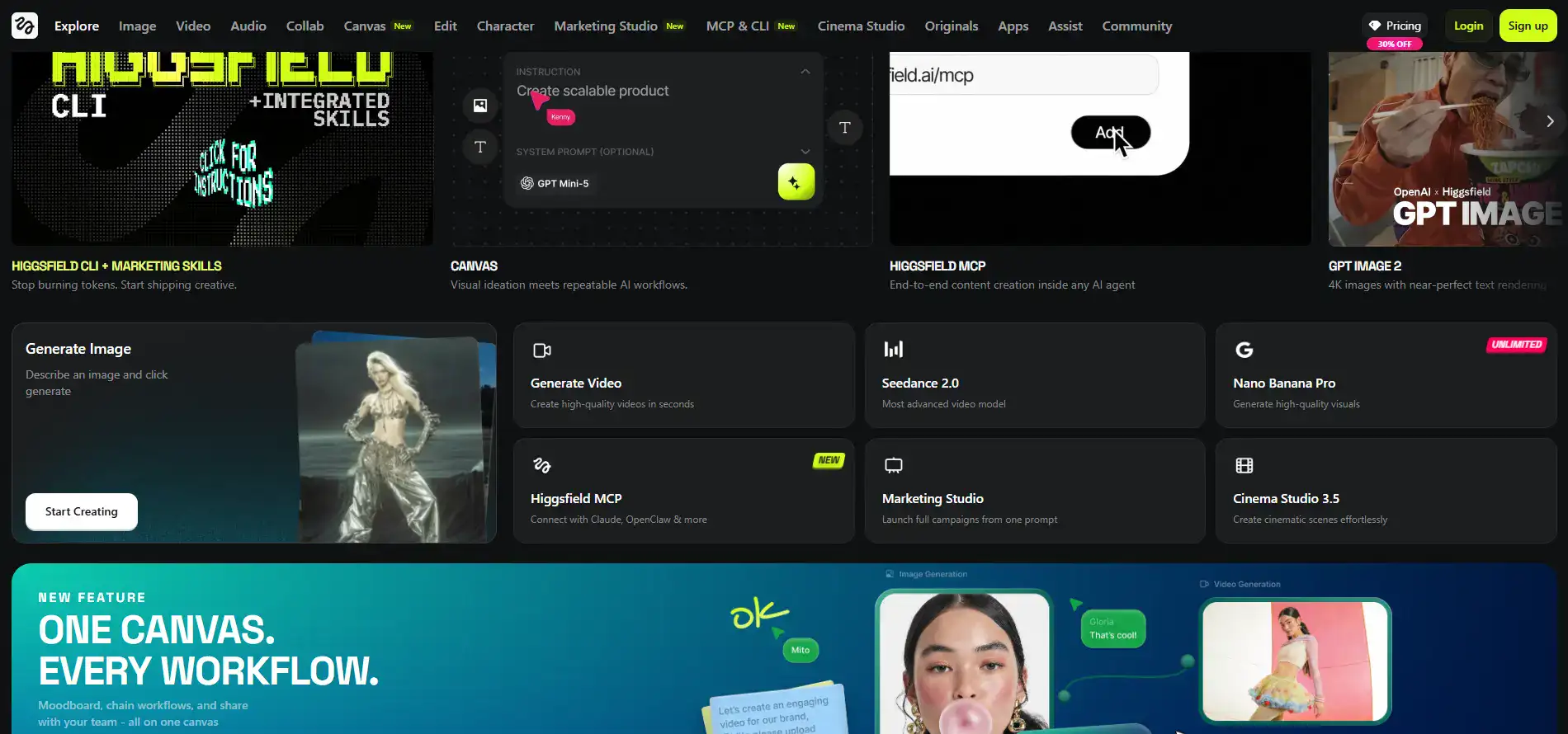
That's the exact problem Higgsfield AI is trying to solve. It's an AI-powered platform that launched in 2025, and it promises to turn your ideas into cinematic-quality videos and images without needing a film degree or a production team. It pulls together over 15 AI engines into one workspace and gives you tools for everything from product ads to editorial-style photos.
Sounds great on paper, right? But does it actually deliver? We spent time digging into what real users are saying, what the platform does well, and where it falls short. Here's what we found.
Higgsfield AI Key Features
Cinema Studio 3.5: A professional filmmaking workspace that gives you control over camera lenses, color grading, and cinematic settings. You can create movie-quality videos whether you’re a beginner or a seasoned pro — no film school needed.
Marketing Studio: Drop in a product URL and get a video ad ready for social media. It’s a fast way to create scroll-stopping ads for your marketing campaigns without hiring a production team.
Soul 2.0: An AI model that generates photorealistic images, especially great for fashion and editorial content. You’ll get natural-looking textures and high-quality visuals that look like they came from a professional photoshoot.
Seedance 2.0: An advanced video generation model that creates realistic, cinematic videos from your prompts. It lets you produce polished content quickly — saving you time and money compared to traditional video production.
Canvas: A visual brainstorming tool that mixes moodboarding with repeatable AI workflows. Your team can collaborate on creative concepts and share ideas in one place, keeping everyone on the same page.
Higgsfield MCP: An end-to-end content creation system built into AI agents. It handles the full process from idea to finished product, so you spend less time juggling tools and more time creating.
Our Take of Higgsfield AI
If you’re a small or medium business owner who needs professional-looking video and image content but doesn’t have a big production budget or a team of editors, Higgsfield AI is worth a closer look. It pulls together over 15 AI engines into one workspace, which means you’re not jumping between a bunch of different tools to get things done.
The interface is pretty straightforward, and the prompt-to-video workflow makes it easy to get started even if you’ve never touched video editing software before. Users on Trustpilot have called out the quality of the images and videos as a real highlight, and the support team seems to be on top of things when issues pop up.
That said, there are some things to keep in mind. The video clips you can generate are on the shorter side, so if you need longer scenes, you’ll probably have to stitch clips together using another tool. Some users have also noticed weird AI glitches like extra limbs or warped backgrounds when there’s a lot of motion happening. And here’s one that matters for budget-conscious business owners: some people have raised concerns about confusing pricing and pushy discount tactics for annual plans, so take your time reading through the pricing page before you commit.
When you stack it up against other AI video tools out there, Higgsfield offers a lot of flexibility because of how many models it gives you access to in one place. It’s not perfect, and it won’t replace a full production team for complex projects, but for creating social media ads, product videos, or marketing content at speed, it delivers solid value for what it costs. Just go in with clear expectations about its current limits and you’ll get the most out of it.
Higgsfield AI's Pricing
This AI content platform offers several pricing tiers tailored to different levels of creators, from beginners to teams and agencies.
The Basic plan, priced at $5 per month (billed annually), is designed for first-time AI content creators and includes 70 credits per month—equivalent to about 35 Nano Banana Pro generations or around 8 Kling 3.0 videos. It provides access to selected models, supports up to 2 parallel video and image generations, and includes all core features with early access to advanced AI tools, making it the most affordable entry point with a low cost per credit.
The Plus plan, discounted to $39 per month (from $49, billed annually), is ideal for more consistent creators, offering 1,000 credits monthly (roughly 500 Nano Banana Pro generations or 114 Kling 3.0 videos), full access to all models, increased parallel generation limits (up to 6 videos and 8 images), and several “unlimited” model options, along with early feature access and improved cost efficiency.
For more advanced creators, the Ultra plan costs $99 per month (discounted from $129 annually) and includes 3,000 credits per month, supporting up to 1,500 Nano Banana Pro generations or approximately 343 Kling 3.0 videos. It allows up to 8 simultaneous video and image generations, includes all features and models, and offers additional perks such as one 365-day unlimited video model, significantly more free generations for certain tools, and up to 55% better value per credit.
Finally, the Business plan, priced at $62 per seat per month (discounted from $89 annually) with a minimum of two seats, is built for agencies and small teams. It provides a shared monthly credit pool (starting at 3,000 total credits), supports 2 to 15 members in a collaborative workspace, and allows up to 16 parallel video and image generations. This plan also includes priority support, team collaboration features like shared projects and chat, usage analytics, custom SSO access, and extensive unlimited model usage, making it ideal for teams managing larger-scale AI content production.
Final Thoughts about Higgsfield AI
So here’s the bottom line. If you’ve been putting off making video content because the tools feel too complicated or the costs feel too high, Higgsfield AI gives you a real shot at creating professional-looking stuff without all the headaches.
It’s not flawless. You’ll run into short clip limits and the occasional weird AI glitch. But for quick social media ads, product videos, and marketing content, it punches well above what you’d expect for the price. Just make sure you read through their pricing page carefully before picking a plan so there aren’t any surprises.
The best way to know if it’s right for you is to get in there and test it yourself. If you’re ready to give it a shot, click the button below and see what you can create.
Higgsfield AI FAQs